<?xml version="1.0" encoding="utf-8"?>
<feed xmlns="http://www.w3.org/2005/Atom">
  <title>Karl Stanley</title>
  <subtitle></subtitle>
  <link href="https://karlstanley.com/feed.xml" rel="self"/>
  <link href="https://karlstanley.com/"/>
  
    <updated>2022-08-03T00:00:00Z</updated>
  
  <id>https://karlstanley.com</id>
  <author>
    <name>Karl Stanley</name>
    <email>karl@redlake.tech</email>
  </author>
  
    
    <entry>
      <title>How I built this site</title>
      <link href="https://karlstanley.com/posts/how-i-built-this-site/"/>
      <updated>2022-08-02T00:00:00Z</updated>
      <id>https://karlstanley.com/posts/how-i-built-this-site/</id>
      <content type="html">
        <![CDATA[
      <h2>Summary</h2>
<p>This site is hosted on <a href="https://aws.amazon.com/">AWS</a> using <a href="https://aws.amazon.com/s3/">S3</a> to store the content and <a href="https://aws.amazon.com/cloudfront/">CloudFront</a> to serve it over HTTPS. I registered the domain with <a href="https://aws.amazon.com/route53/">Route 53</a>.</p>
<p>Content management comes courtesy of <a href="https://www.11ty.dev/">eleventy</a> and the visual presentation comes from <a href="https://eleventyduo.netlify.app/">eleventy duo</a> by <a href="https://github.com/yinkakun/eleventy-duo">yinkakun</a>.</p>
<h2>Hosting with AWS</h2>
<p>I used <a href="https://aws.amazon.com/serverless/sam/">AWS SAM</a> to set up the infrastructure for this website. AWS SAM is an abstraction layer that sits on top of <a href="https://aws.amazon.com/cloudformation/">CloudFormation</a> and simplifies some common use cases (<em>e.g.</em> setting up a <a href="https://aws.amazon.com/api-gateway/">REST API</a> powered by <a href="https://aws.amazon.com/lambda/">Lambda</a> functions).</p>
<p>High-level info on what's required to provision a website using AWS is available at the <a href="https://aws.amazon.com/premiumsupport/knowledge-center/cloudfront-serve-static-website/">AWS knowledge centre</a>. A step-by-step walkthrough of all the pieces required to make this work are <a href="https://docs.aws.amazon.com/AmazonS3/latest/userguide/website-hosting-custom-domain-walkthrough.html">part of AWS's documentation</a>. More details, including the CloudFormation templates you'll need to repeatably deploy this via the <a href="https://docs.aws.amazon.com/serverless-application-model/latest/developerguide/serverless-sam-cli-install.html">AWS SAM CLI</a> are available on <a href="https://github.com/aws-samples/amazon-cloudfront-secure-static-site">GitHub</a>.</p>
<h3>Default root object</h3>
<p>We're building a static site, which means that for <a href="https://en.wikipedia.org/wiki/Permalink">permalinks</a> to work, we must serve the <code>index.html</code> file from a folder when a folder name is requested. For a traditional web server like <a href="https://httpd.apache.org/">Apache</a>, we use <a href="https://httpd.apache.org/docs/current/mod/mod_rewrite.html">mod_rewrite</a> to rewrite URLs as follows:</p>
<p><code>https://karlstanley.com/blog/</code> -&gt; <code>https://karlstanley.com/blog/index.html</code></p>
<p>With AWS and other serverless technologies, we don't have a web server to configure, so this approach won't work. But not to worry, CloudFront provides a way to run functions on the incoming HTTPS requests, meaning we can do our URL rewriting inside a CloudFront function.</p>
<p>This <a href="https://stackoverflow.com/questions/31017105/how-do-you-set-a-default-root-object-for-subdirectories-for-a-statically-hosted">StackOverflow post</a> covers the details of how to set this up.</p>
<h2>Content Management with Eleventy</h2>
<p>I like the <a href="https://jamstack.org/">Jamstack</a> approach to building web sites, as it uses concepts and tools that are familiar to me, given my engineering background, such as:</p>
<p> </p>
<ul>
<li>Create content using markup (<em>e.g.</em> <a href="https://www.markdownguide.org/">MarkDown</a>) and compile it to its final form, rather than writing HTML directly or using a WYSIWYG editor.</li>
<li>Store content in a source-control system (<em>e.g.</em> <a href="https://github.com/">GitHub</a>) rather than in a content database (like <a href="https://wordpress.com/">WordPress</a>).</li>
<li>Work offline and publish the entire site at once every time it needs to be updated, rather than creating a site that gets deployed once and then evolves over time as it is updated.</li>
</ul>
<p>The end result is a web site that uses familar management tools, has fewer security concerns (no user logins or databases to hack) and performs better than a typical LAMP site (content is static and can be efficiently cached by a <a href="https://en.wikipedia.org/wiki/Content_delivery_network">CDN</a>).</p>
<h3>Why eleventy?</h3>
<p><a href="https://www.11ty.dev/">Eleventy</a> wasn't my first choice of tool for this site. I originally tried to set it up using <a href="https://gohugo.io/">Hugo</a>, but I found it hard to adapt to my needs. Hugo's main selling point is its compile speed, which I'm sure is critical when working on large scale websites, but for my own needs I'm OK to wait a few seconds for my site to render when I update it.</p>
<p>The attraction of eleventy is its relative simplicity compared to Hugo - I found that modifying system behaviour with JavaScript had a much shallower on-ramp compared to learning advanced Hugo features such as <a href="https://gohugo.io/templates/shortcode-templates">shortcodes in Hugo</a>.</p>
<h3>Useful videos</h3>
<p>This 20 minute intro tells you everything you need to know to get started with eleventy:</p>
<iframe width="560" height="315" src="https://www.youtube.com/embed/p81J7G1qFAM" frameborder="0" allow="accelerometer; autoplay; clipboard-write; encrypted-media; gyroscope; picture-in-picture" allowfullscreen></iframe>
<p>Once you have the key concepts from the video above, follow this one to give you just exactly what you need in 3 minutes, a bit like a reference manual in video form:</p>
 <iframe width="560" height="315" src="https://www.youtube.com/embed/BKdQEXqfFA0" frameborder="0" allow="accelerometer; autoplay; clipboard-write; encrypted-media; gyroscope; picture-in-picture" allowfullscreen></iframe>

    ]]>
      </content>
    </entry>
  
    
    <entry>
      <title>Content Security Policy</title>
      <link href="https://karlstanley.com/posts/content-security-policy/"/>
      <updated>2022-08-03T00:00:00Z</updated>
      <id>https://karlstanley.com/posts/content-security-policy/</id>
      <content type="html">
        <![CDATA[
      <p>In the <a href="/posts/how-i-built-this-site/">previous post</a> I showed how to set up a static web site on AWS. After posting, I noticed that the YouTube videos I embedded in the page wouldn't work. In this post I talk about why this happened and how to fix it.</p>
<h2>Content Security Policy</h2>
<p>The great strength of the Web is that we can link things from different places together, <em>e.g.</em> we can use an <code>img</code> tag to display an image hosted somewhere else or we can import a javascript library from a CDN using the <code>script</code> tag. So far so good. However, we might not want to allow anyone to link anything from anywhere, especially when it comes to active content like scripts or iframes that could be used for nefarious purposes. Whether or not a browser will allow a piece of content to be embedded in a web page is set by the <a href="https://content-security-policy.com/">Content Security Policy</a> (CSP) header.</p>
<h2>CSP in AWS</h2>
<p>In a traditional set up, the <code>Content-Security-Policy</code> settings are part of the <a href="https://stackoverflow.com/questions/62105213/setting-content-security-policy-in-apache-web-server">webserver configuration</a>. In a serverless deployment, we don't have a web server - instead we have a CloudFront distribution that exhibits a set of 'behaviours' defined by 'policies'.</p>
<p>By default, a CloudFront distribution does not set CSP headers, meaning you can embed whatever you like in your web page. We might prefer to lock this down somewhat so we don't have to worry about exposing our site visitors to potentially malicious content. Add the setting below to 'Content-Security-Policy' under <code>CloudFront -&gt; Policies -&gt; Response headers -&gt; &lt;POLICY_ID&gt;</code> to prevent anything other than scripts or images hosted on this website domain to be added to the content.</p>
<pre><code>default-src 'none'; img-src 'self'; script-src 'self'; style-src 'self';
</code></pre>
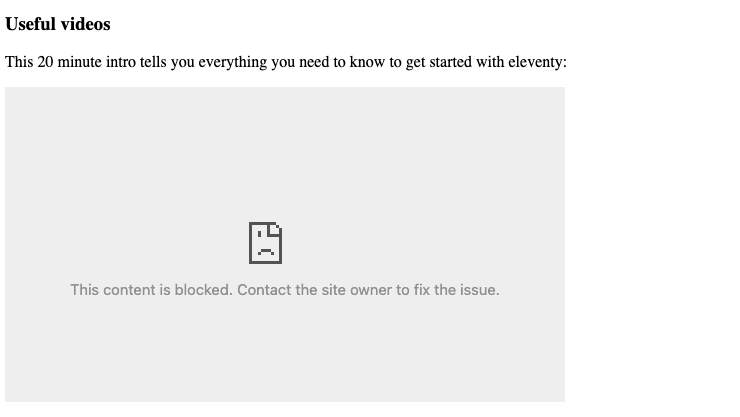
<p>This works fine up until the point where we want to embed a YouTube video on a page or use <a href="https://fonts.google.com/about">a specific font</a>. Because the browser won't allow anything to be embedded in the page other than scripts and images from the same host, we see the following instead of our YouTube video. And our 'IBM Plex Sans' font has been replaced by the default Times New Roman.</p>
<p><img src="/images/../../images/youtube-blocked-content.png" alt="A YouTube video blocked by the browser due to CSP settings"></p>
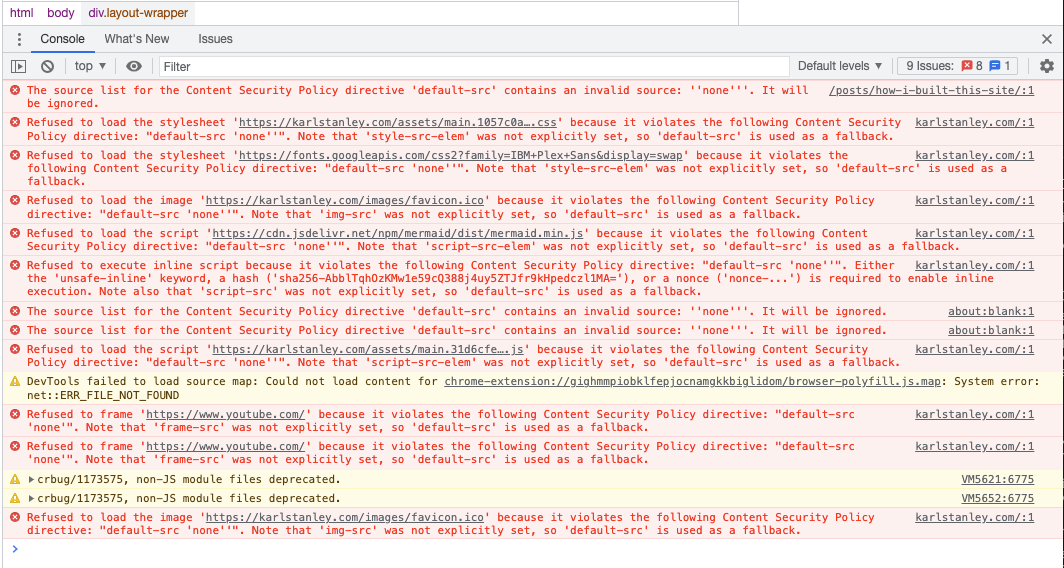
<p>We solve this by whitelisting the domains we want to allow content for. For this site, we want to be able to embed YouTube thumbnail images, some <a href="https://nodejs.org/">node.js</a> packages, YouTube videos and google fonts. To see what the browser is blocking, right-click on the web page in Chrome and click 'Inspect'. You'll see an angry looking red list of errors like the below:</p>
<p><img src="/images/csp-violations-chrome-inspect.png" alt="CSP warnings from Google Chrome"></p>
<p>Each error will tell you which domain the blocked content is coming from. Add these domains to the appropriate section of the CSP header in the Policies screen mentioned above. I ended up with the following:</p>
<pre><code>default-src 'none'; img-src 'self' https://i.ytimg.com/; script-src 'self' https://cdn.jsdelivr.net/npm/; style-src 'self' https://fonts.googleapis.com; frame-src https://www.youtube.com/; font-src https://fonts.googleapis.com https://fonts.gstatic.com/
</code></pre>
<p>Notice that the special sources 'none' and 'self' are surrounded by single quotes, while domain names are not (if you put the domain names in quotes they will not work!). Multiple sources for the same type of content are separated by spaces. Each content type is separated by a semicolon. The <a href="https://docs.aws.amazon.com/AmazonCloudFront/latest/DeveloperGuide/understanding-response-headers-policies.html">AWS documentation</a> says there's a 1783 character limit for CSP headers.</p>
<h2>Conclusion</h2>
<p>Content-Security-Policy protects site visitors from malicious content, but if it's set too restrictively it can cause unintended behaviour. If your YouTube videos are not embedding correctly, inspect the page using your browser's developer tools to make sure the content isn't being blocked by policy.</p>

    ]]>
      </content>
    </entry>
  
</feed>